Agents do the work. People approve.
Busi brings agents into SAP Business One, through the AI assistant your company already uses. It reads SAP as you, prepares every change and shows it in SAP's own form. Nothing is written until a person approves, and Business One stays the record.
Three problems. Three answers.
The demand for agents is here. A safe way into Business One is not, yet.
Trapped in the desktop client
Years of business logic locked in the client and its add-ons. Every change waits for a developer or a consultant.
An AI-first client
Everything the SAP client does, on pages that look like SAP's own forms, on web and mobile. Your logic carried over, in plain language.
Agents outside SAP
Companies build agents and use AI beside SAP: silos, leaks and no oversight.
A connector in your own assistant
Agents work inside SAP, as the person, under SAP's own authorizations. What the company learns is kept and shared as company skills.
No safe way to write
Agents are probabilistic, the ledger is deterministic. A yes in a chat window is not control.
The gate
Every change prepared and shown in SAP's form. A person approves, with a passkey when money moves. All on record.
Ask. Check. Press.
Say what you want the way you would tell a colleague. Busi does the reading and the typing. You keep the last word, on a page that shows exactly what SAP will get.
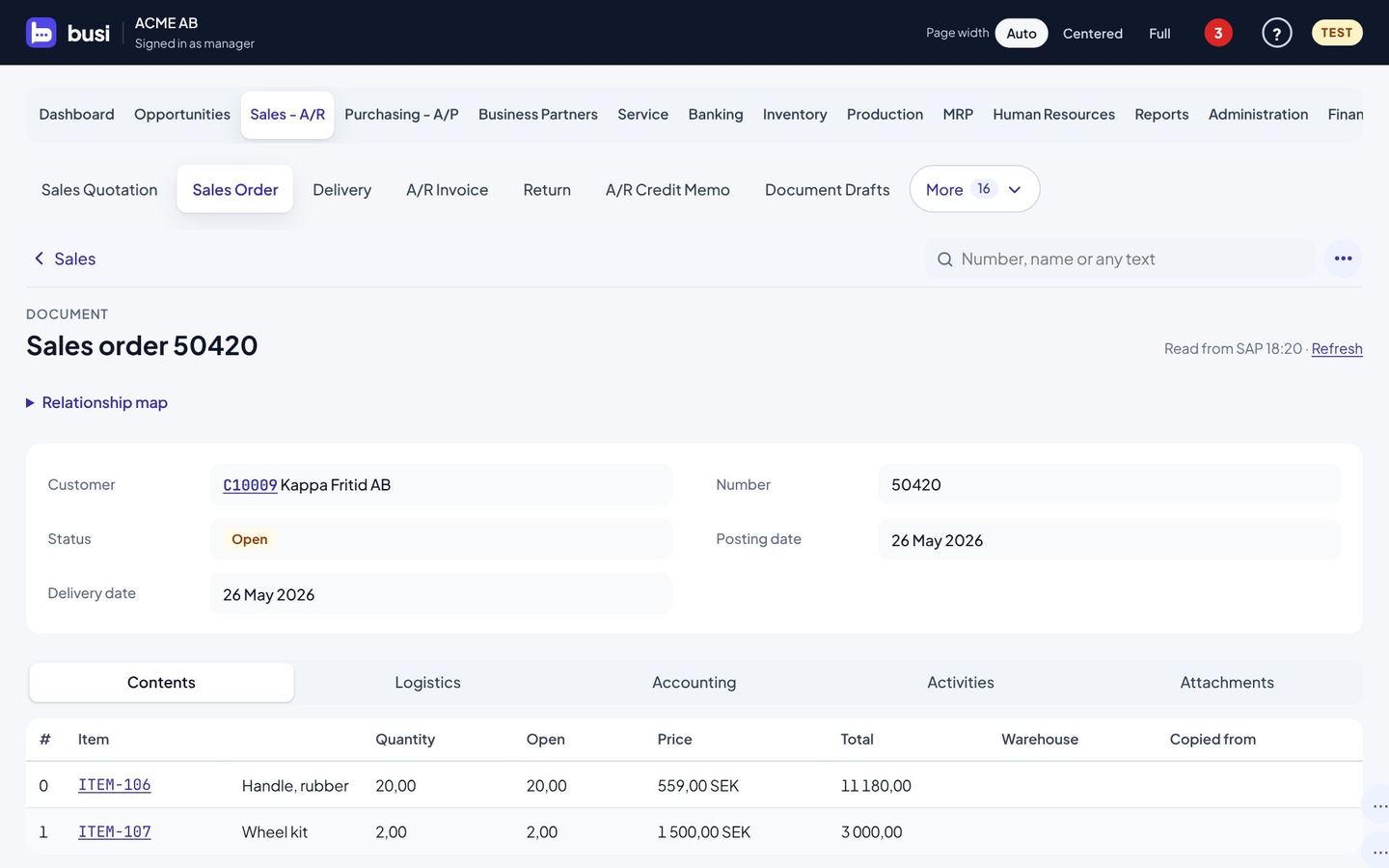
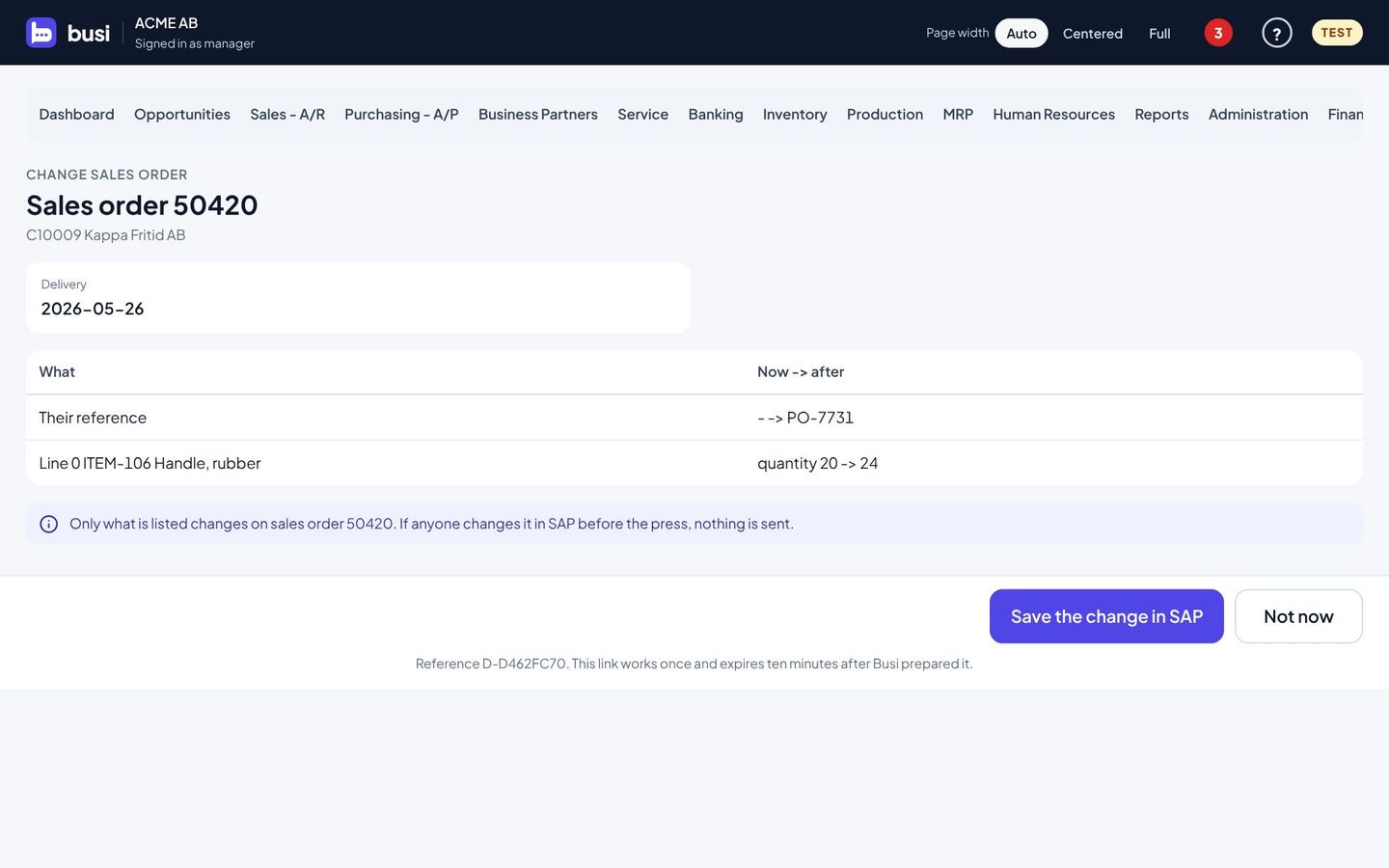
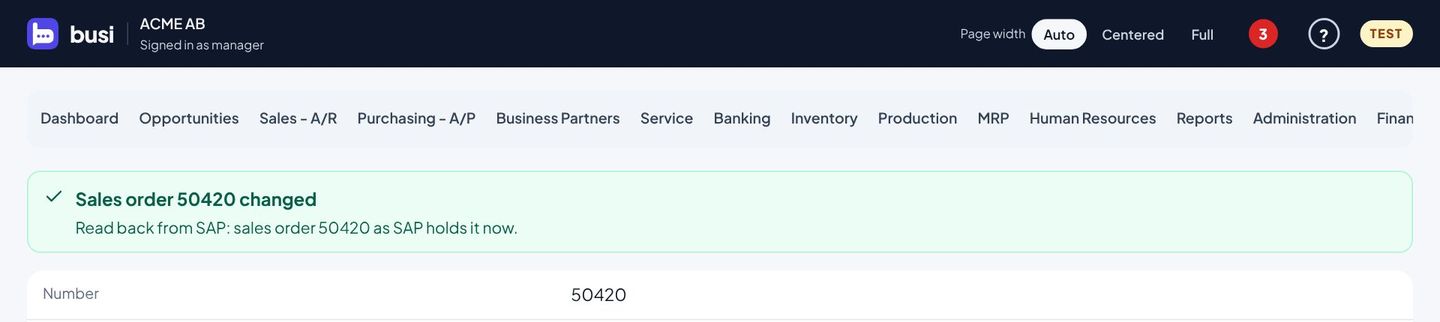
Real screens from Busi's sample company. Every name and number in it is invented.
Two short films from the sample company
Three minutes each, no sound yet. One day in production, and how one person's know-how becomes the whole company's. All films →
Every part of SAP Business One, on a modern page
Busi does what the SAP client does, and more where it helps. Lists, records and tabs look like SAP's own forms, so nobody has to relearn their work. Pick a screen.
Wherever your people are
Every page works on the phone and the tablet as well as the desktop. Each person sees it in their own SAP language, light or dark.
The press is the gate
Agents recommend. A person approves. SAP executes. The gate sits between every agent and your books.
- Your sign-in, your rightsEveryone works as their own SAP user. Busi sees only what SAP already lets them see.
- Every change is shown firstA sheet lists exactly what SAP will get. Asking never writes anything.
- A person pressesOnly the press sends it, and the link works once. When money moves, it takes a passkey: a finger, not a click. The AI can prepare but never approve.
- If SAP moved, nothing is sentWhen someone changed the record since, the press stops and says so.
- Read back, every timeAfter the press Busi reads the result from SAP, and every press is in the history.
- Test before liveEach company is marked test or live on every page. New ways of working run on test first.
Your business runs on logic only the desktop can read
Every rule, shortcut and document you built over the years works in one place: the desktop client. Everywhere else, it simply isn't there.
Trapped in the UI
Customised code fires only when someone clicks in the right window on the right PC.
Written for specialists
Nobody in the business can read it, so every change becomes a ticket and an invoice.
Left behind by the future
The web, the phone, the tablet and AI assistants all pass straight by it.
A rule hidden in an add-on. It only fires when someone clicks in the desktop client.
Don't deliver to a customer who hasn't paid their down payment.
A shortcut built into one window, understood by one consultant.
Show the delivery week on every order line.
A report layout only a specialist can open and change.
Your order confirmation, with your logo, in the customer's language, from any device.
Import it. Store it. Manage it in plain words.
The Busi connector does the heavy lifting. You keep every rule you rely on, and finally understand all of them.
Import and translate
Busi imports the customised code trapped in the desktop UI and translates it into normal language that anyone in the business can read.
Store it in your company file
Your logic is stored in your own company file inside the Busi connector, so it is available to every modern environment at once.
Manage it with normal text
From then on you change your business logic by writing what you want, in plain text. No code, no specialists, no waiting.
MCP-native. Plug into any AI agent.
Busi is an MCP connector. MCP is the open standard that lets AI assistants work with business systems. Plug Busi into the assistant your company already uses, and it works with your SAP Business One as your own signed-in user. You choose the assistant; the company keeps control.
Bring what you built. Or start fresh.
Whatever your company built into the desktop over the years, bring it along. Or start fresh from our standards.
Bring what you have
Point Busi at what you use today. It is imported, translated into plain words and kept in your company file, ready for every device. Nothing lost.
Or start from scratch
Busi comes with standard templates for both business logic and documents.
Start on test. Go live one step at a time.
No big-bang project. Busi runs beside your live company, and every new way of working is tried on a copy first.
- 1ConnectOne connector per company, signed in with SAP Business One's own sign-in. Nothing to install for users.
- 2Carry overYour business logic and print layouts are imported from the desktop client and translated into plain words.
- 3Try it on testA test company runs beside live. Your people learn on it, and every change is tried there first.
- 4Go live by moduleThe first module goes live, then the next, each one approved before it reaches live.
How Busi is bought
- A base fee per companyThe connector, the gate, hosting, backups, the test company and support.
- A named seat per userAn agentic user works through the assistant and every page. A web user works on the pages only, for approvers and operators.
- A fixed implementation packageSized by the number of users, with a written list of what it includes.
Sold by SNPS and through SAP Business One partners. Ask us for a price, or read the one-page overview (PDF).
Ready-made workflows for the whole company
Beyond your own logic, you get our standard workflows, built for the people who design, sell, plan, make and ship, and skills the company saves for itself. Everything is built on SAP Business One standards. Pick a tab and watch one play.
Agents do the work. People approve.
Business One stays the record.
See Busi on your own SAP Business One company.
egil.snodgrass@snps.se
Email usView the one-page overview (PDF)Download itBusi is designed and built by snps.se. SAP and SAP Business One are trademarks of SAP SE. This page describes an independent product and is not an SAP publication. Examples are illustrative.